Help · Set up your link · by provider · 3 min read
Set up a reusable Google Meet link
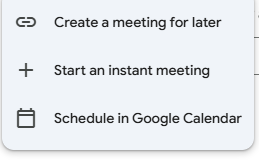
Use "Create a meeting for later" — a Meet link you save and reuse.
Google Meet's reusable link comes from Create a meeting for later (works on a free Gmail account). For maximum durability, attach it to a recurring Calendar event.
1
New meeting → Create a meeting for later
In meet.google.com, click New meeting and choose Create a meeting for later — not "Start an instant meeting," which dies after one use.
2
Copy your reusable link
Google shows your link and reminds you to *save it so you can use it later*. Copy the
meet.google.com/… link.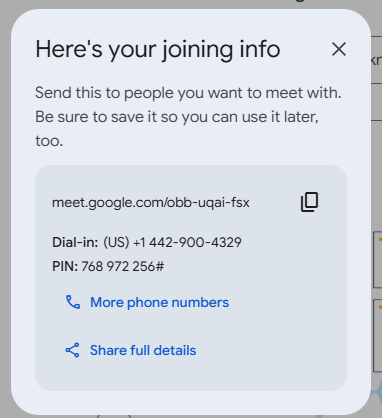
3
(Even better) attach it to a recurring Calendar event
Create a repeating event in Google Calendar and add Google Meet — that keeps the link alive indefinitely.
4
Paste it into AnyRoom
Drop the
meet.google.com/… link into a new or existing meeting — AnyRoom recognizes Google Meet automatically.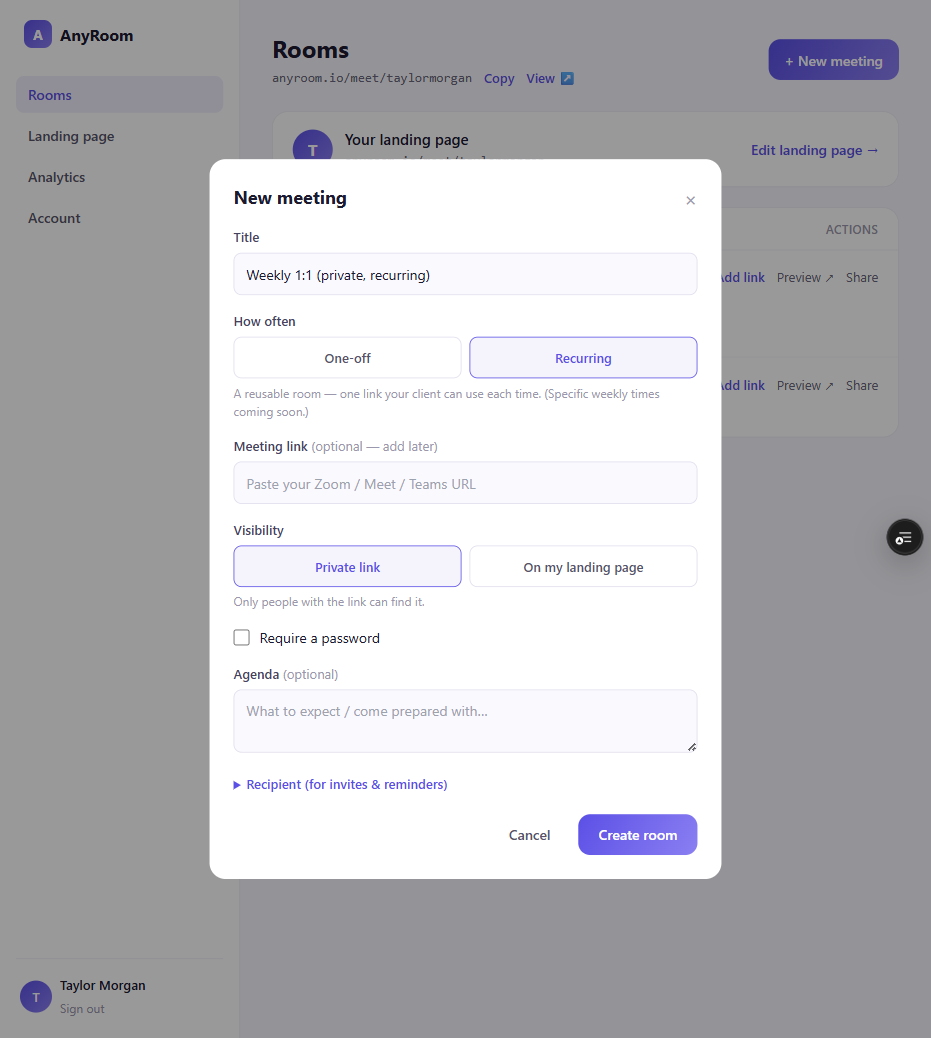
Good to know
Never use a "Start an instant meeting" link — those die after one use. Free group calls cap at 60 min, and guests join via "ask to join" (admit them, or have them sign into the Google account you invited). Your Google account also has to be able to *create* meetings — a locked-down work account that only lets you "join" can't host one (no New meeting button is the tell).